Showing posts with label Usb tool. Show all posts

Sunday, April 6, 2014

Multiboot USB and CD or DVD Creator

Antivirus Multi Boot Creator

Multiboot USB and CD or DVD Creator

The multiboot USB supports and manage USB stick, pen drive, hard disks, SSD or removable media.

All one has to do is download the desired ISOs with the integrated downloader and use SARDU to add them to the multi boot menu. After the multiboot support builded can be test with the QEMU integrated
SARDU is simply the best solution to combine all of your bootable ISOs into one with a simple menu multiboot! That in turn can be burnt to any device and make it bootable (providing that your BIOS supports it). Basically, this eliminates the need to carry around heaps of different bootable CDs.

SARDU can also be used to build one usb multiboot for install Windows XP , Windows Vista,Windows Seven and last Windows Eight, very handy for when there is no optical drive available like tablets or netbooks.

The tool is a windows software for Multiboot DVD ISO and Multiboot USB Creation that merges and turns all those bootable CDs into one media support.

The user can change the language at any time using the language menu.
*personal and non commercial use, read the license.


Other Software manageable

The user must download all the CD - DVD ISO images that he wants to integrate in the SARDU DVD ISO using the integrated download manager.
Downloaded ISO images have to be placed inside the "ISO" folder (customizable selecting the "ISO icon" at the top of the GUI).

All software has their own buttons and checkboxes. SARDU manages only these programs.

If a checkbox is disabled (grey) the ISO of that software was not found. Pressing an application's button causes SARDU to download the bootable ISO from the manufacturer's website. Once downloaded, it is made ready for use by checking the checkbox. Downloads can be done manually by disabling the function ' File -- Enable direct download'. The user can update the status of the ISO folder from File -- Refresh ISO/IMA menu (N.B.: do not change the default names of the individual ISOs because they won't be recognized by SARDU.) If a checkbox is unchecked (white) the single ISO is disabled and not-active.

Build customized version with your ISOs using add extra options

Many users requested that I add the ability to include stand-alone software. Inside the ISO folder I have included an `extra` folder where additional files can be put. You can enable this folder if it does not exist by pressing File -- Enable Extra.
The user can load an ISO not directly supported/mentioned in the SARDU interface: Menu --> Add Extra ISO (Test) or Menu --> Add Extra ISO from memory (Test).
The user can load their own customized folder and/or menu iso/syslinux and GRUB4Dos. This option adds unsupported ISOs or customized folders/menus, is for advanced users, and I don't provide customer support related to its use.


Saturday, April 5, 2014

Wondershare MobileTrans + Patch

null

Wondershare MobileTrans + Patch

Transferring apps, contacts, media and text messages is easier now. If you think that getting stuff from your old mobile to your new mobile is difficult, think again. Cellular companies tend to only transfer contacts between phones and leave out the call logs, music, text messages, pictures, apps and the videos. WondershareMobileTrans is a piece of software that will do all that for you. Transfer more than just contacts: Copy over your text messages, apps, photos, call logs and music between all your devices with a single click. 

Transfer to multiple devices: Transfer any data you want shared between different devices such as Android, iOS and Symbian. Contract phones are also supported: Move your data from old phones to new ones, regardless of which cell service the phones have.

Key Feature: 1.Transfer call logs, music, photos, text messages, apps and videos and not just the contacts of the phone. 2.Amazing contact transfer performance which includes job titles, email addresses, names of companies and many more. 3.Supports over 2,000 types of phones which includes Symbian (Nokia), Droids and all types of iPhone, including the iPhone 5. 4.Across different networks won't be a problem either. Verizon, AT&T, T-Mobile and many other networks. 5.It's free of any risks and you'll keep all your original quality and you'll only be able to read it yourself. Phone to phone in just one click With a click data can be transferred between your phones, whether they are Symbian phones(Nokia), Android phones (Samsung, HTC) and IOS phones (iPhones).

Transfer any data between two phones with no fear of any data being lost. You can even transfer data over without having to stop the process. Completely free of any risk. You can transfer all you content between any supported phones that on set to any network. Verizon, AT&T, T-Mobile, Sprint and others without hassle. No more relying on the personnel at the stores to move contacts over from old to new phones. MobileTrans transfers anything and everything you need with one click.

Use the Wondershare MobileTrans if you want to Move data from phone to phone on the same network;Migrate from different networks and keep the data on your phone;Swap data from contract phones to non-contract phones.

What's new in this version: Version 4.2
  • 1. Supported retrieving data from iTunes® backups;
  • 2. Supported iTunes music files and playlists transfer to Android and other supported devices;
  • 3. Optimized the primary window of MobileTrans.


Download here Wondershare Mobile Trans - Link 1


Wednesday, April 2, 2014

avast! Pro Antivirus 2014 + Keys

avast! Pro Antivirus 2014

Powerful antivirus for everyday use

Run shady files in a virus-proof environment

Unsure if the file you just downloaded is safe? Run it in the Sandbox, a virtual environment where you can run even the most heavily infected files safely. But you’ll know if it’s safe anyway, with our FileRep (file-reputation scanning) technology

Intelligent antivirus, anti-spyware, & anti-malware

Not just a marketing phrase! Our DynaGen-powered antivirus streams hundreds of tiny real-time updates to your PC’s virus database each day, to catch new malware faster. Its decisions are based on artificial intelligence that works inside the algorithm responsible for analyzing suspicious files.

Did it break? Fix it!

If anything nasty happens to your computer and some malware blocks access to your avast!, you fortunately were able to create an image of your avast! setup on a USB stick or CD/DVD ahead of time, which will help you restore the PC to its normal functions.

Saturday, March 29, 2014

WinRAR v5.10 beta 1 x86 and x64 Incl Keygen


WinRAR v5.10 beta 1 x86 and x64 Incl Keygen


Description:

WinRAR is a powerful archive manager. RAR files can usually compress content by 8 percent to 15 percent more than ZIP files can. WinRAR is a powerful compression tool with many integrated additional functions to help you organize your compressed archives. It can backup your data and reduce size of email attachments, decompress RAR, ZIP and other files downloaded from Internet and create new archives in RAR and ZIP file format.
WinRAR puts you ahead of the crowd when it comes to compression. By consistently creating smaller archives, WinRAR is often faster than the competition. This will save you disc space, transmission costs AND valuable working time as well. WinRAR is ideal for multimedia files. WinRAR automatically recognizes and selects the best compression method. The special compression algorithm compresses multimedia files, executables and object libraries

Features:
Using WinRAR puts you ahead of the crowd when it comes to compression by consistently making smaller archives than the competition, saving disk space and transmission costs.
WinRAR provides complete support for RAR and ZIP archives and is able to unpack CAB, ARJ, LZH, TAR, GZ, ACE, UUE, BZ2, JAR, ISO, 7Z, Z archives.
WinRAR offers a graphic interactive interface utilizing mouse and menus as well as the command line interface.
WinRAR is easier to use than many other archivers with the inclusion of a special "Wizard" mode which allows instant access to the basic archiving functions through a simple question and answer procedure. This avoids confusion in the early stages of use.
WinRAR offers you the benefit of industry strength archive encryption using AES (Advanced Encryption Standard) with a key of 128 bits.
WinRAR supports files and archives up to 8,589 billion gigabytes in size. The number of archived files is, for all practical purposes, unlimited.
WinRAR offers the ability to create selfextracting and multivolume archives.
Recovery record and recovery volumes allow to reconstruct even physically damaged archives.
WinRAR features are constantly being developed to keep WinRAR ahead of the pack.


Homepage: http://www.rarlab.com
Name: WinRAR v5.10 beta 1 x86/x64 Incl Keygen
Type: Software
OS: Xp/Vista/7/8
Tablet: Keygen
Status: Working
Size: 3.70mb

Download here(Click here to download)-Datafilehost

Thursday, March 27, 2014

USB Safely Remove

One stop hotkey
USB Safely Remove is an enhanced and hassle-free replacement for Windows safe removal tool. It saves your time and gives you more power on active work with any kind of USB/eSATA devices.
It saves time...
Displaying what prevents a device from being stopped
Safe removal via hotkeys
Lets you recognize a device in a snap...
The handy menu with device icons
Real device names and the ability to rename them
Lets you hide devices you never need to stop
Extends your portable opportunities...
Program autorun on device connection/disconnection
Command line for safe removal
Does unique things!
Hiding drives of empty card reader slots
Powers off devices in Vista and Win7
Card reader memory cards ejection one-by-one
Re-activating a device that just stopped! 

Download here

MediaMonkey Gold 4.1. 1.1700 FULL + Serials


MediaMonkey Gold 4.1. 1.1700 FULL + Serials-PH

Gold Version Features

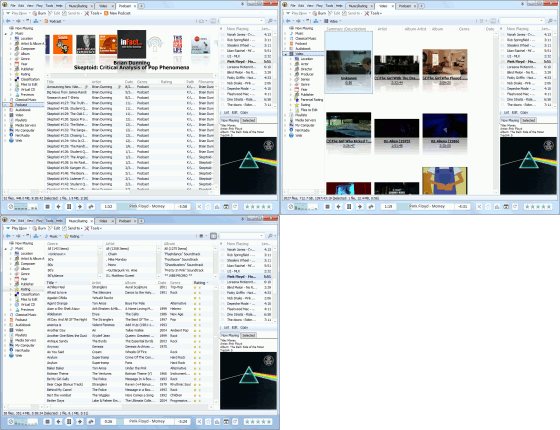
Multiple Media Collections
'Collections' allow large media libraries to be segmented, customized and managed independently. For example Classical Music, Jazz, Kids Music, Home videos, TV, etc. can each configured with custom views and playback rules. For example, a Classical Music collection can be configured to display a Conductor node and an Original Year column, and play with cross-fading disabled, whereas Contemporary Music wouldn't.
MediaMonkey gives you all the tools you need to manage large music / movie collections.

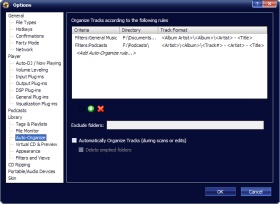
Organize Files Automatically


Automatically organize and rename audio / video files on your hard drive into a logical hierarchy of your choice according to a set of rules that you define. Classical music can be organized by Composer and Home Videos by Date and MediaMonkey will take care of organizing them automatically as a background process.

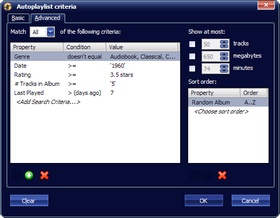
Advanced Auto Playlists


Create advanced Auto Playlists which automatically generate a music mix to suit your mood. Just define practically any set of criteria and the mix is automatically created.
Synchronize Advanced Playlist with Portable Devices, giving you the perfect tool for rapidly downloading a subset of your collection to your device. For example, you can choose to sync a random subset totaling 256 MB of music that match a defined set of criteria.
For the average user, creating a music mix and synching it couldn't be easier.

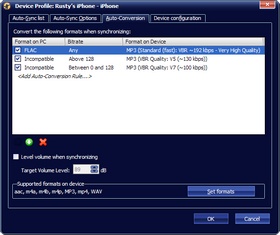
Auto-Conversion and Leveling


Auto-conversion allows you to automatically sync, share (over DLNA) or burn tracks, converting tracks on-the-fly to a format that is supported by your iPod/iPhone or other portable device or CD/DVD/DLNA player, while retaining all metadata.
Auto-conversion can also convert tracks to lower bitrates to make more effective use of the limited storage capacity on a portable device. This is especially useful for lossless music collections, which can't fit on a portable device.
In addition, Auto-leveling levels track volume on-the-fly so that tracks play at a steady volume on CDs/DVDs and on devices that don't support volume leveling (i.e. most devices besides iPods).

Professional-quality CD Ripping

Secure Ripping detects when a CD has been damaged and throttles the disc's rotation until it is sufficiently slow to deliver identical reads on at least 2 occasions. Once a disc has been ripped, MediaMonkey can validate that it was bit-perfect by comparing the resultant data to that of the AccurateRip database.
MediaMonkey delivers professional quality ripping in consumer-friendly software.

More Great Gold Benefits

·         Automatically lookup Artwork and lyricsso that you don't have t. MediaMonkey can also download the metadata without updating the tags so that it isn't saved until you approve.
·         Find music with advanced search functionality that digs through your collection to find tracks according to almost any criteria that you can think of. Search for Composer, Year, Beats per minute; find Lyrics, etc. and stop pulling your hair out trying to find music you know you have.
·         Encode unlimited MP3s without having to manually install a new MP3 encoder (the free version of MediaMonkey includes a time-limited LAME MP3 encoder. If you’re so inclined, you can manually replace it with the free LAME encoder, or you can just upgrade to MediaMonkey Gold).
·         Catalog your physical CDs and use the Virtual CD feature to keep track of what CDs you own and at the same time see which subset of tracks from those CDs are copied to your hard drive. Instead of tracking your CDs and tracks separately, the virtual CD function gives you an integrated view..
·         Import and save audio tracks from Audio CDs and MP3 CDs with unprecedented flexibility using the Virtual CD. It allows you to sample tracks from various sources, select which ones you want to import, and then import and save the files in a single operation.
·         Create Previews, short samples of audio tracks that you can use when trying to decide which audio files you want to add to your collection.
·         Use a Sleep Timer to play your music, gradually fade it over a set period of time, and then turn off your PC — perfect for listening to tunes before you go to sleep.
·         Burn CDs at the maximum speed permitted by your hardware.